
Welcome to Stygian OS
Developer Setup
Customize your development environment with a single script.
Browse the tabs above to explore available tools.
Select the languages, editors, and utilities you need.
Go to "Generate Script" to get your custom installer.
Dev Tools & Editors
Containerization
Languages & Runtimes
Python Tooling
Databases (Servers)
Database GUIs
Shell & Utilities
Terminals
Web Browsers
VPNs (client/server)
Ready to Build?
You have selected 0 tools.
When you first boot into Stygian OS, you won’t be greeted by a simple static “Read Me” file. Instead, you’ll immediately encounter the Stygian OS Welcome App—your powerful, centralized hub for configuring your desktop and essential development environment exactly how you want it. This native application ensures that your operating system adapts to you, not the other way around. This is why we replaced the traditional “install everything” approach with a flexible, script-generating tool.
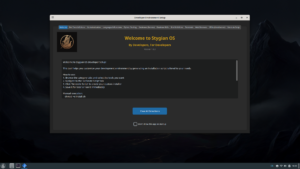
Customization at Your Fingertips
The core purpose of the Welcome App is to transform your new system into a ready-to-work development workstation in minutes.
-
Select Your Stack: Easily check the boxes for the tools you need—whether it’s Git, VS Code, specific programming languages, or utility packages.
-
Build Your Script: The app automatically generates a custom installation script based on your selections. This ensures you only install what is necessary, keeping your Stygian OS installation lean, fast, and free of unnecessary clutter.
-
Zero Bloat: By installing only your selected packages, you conserve disk space and system resources, ensuring your machine performs optimally for the tasks that matter most: coding, designing, or creating.
Seamless Experience: Desktop App meets Web App
For maximum flexibility, we offer two ways to access our powerful setup tool:
-
The Native App: The application you launch immediately after installation provides a fast, integrated experience right on your desktop.
-
The Web Version: We’ve ported the full functionality of the native Welcome App to the web. The web version includes all the features of the original desktop app, allowing you to configure and generate your install script from any browser.
The best part? The web app is dynamically linked to our GitHub repository. This means that any new utility packages, dependency updates, or bug fixes added by the community will appear instantly in the web version, ensuring you always have the most current setup options.
Important Note on Stability
We value transparency. While Stygian OS is fully functional, please note that the Welcome App and its web counterpart are actively being developed. Not all installation options have been extensively tested for every possible combination. You may encounter occasional errors or unexpected behavior when selecting certain options. We encourage users to report any issues on our GitHub page!
Launch the Web Setup Tool
Ready to configure your ideal Stygian OS environment? Click the button below to launch the dynamic, always-up-to-date web application.